How to plan a trip with AI on your Mac — flights, Airbnb, and a full itinerary
Using AI to plan a trip usually means a chatbot spitting out a generic itinerary you still have to go book yourself. This is about doing the whole thing — flights, lodging, and a day-by-day plan you can actually act on — with an AI trip planner that runs natively on your Mac.
Why planning a family trip is still broken
Travel planning is never easy — especially a family trip overseas.
Booking the airline tickets alone can take days, sometimes weeks, if you’re hunting for a better deal. For a solo traveler that’s not a big deal. With a family of five it’s a different story: even a small price fluctuation moves the whole budget.
And then there are preferences. Flying from the US to Europe, I prefer European carriers over US domestic ones — the food and service are usually a lot better. When a direct flight isn’t an option, I avoid connections inside the US, especially on the return leg, because you have to clear immigration and customs at the connection instead of at your final destination. With kids in tow, that matters.
Then there’s the itinerary itself. We rarely stay more than a few days in one place — summer trips usually mean several cities or countries — so car rentals, Airbnbs, and hotels all stack up. In practice that looks like a browser with a dozen tabs open, constant multitasking, and asking ChatGPT for recommendations on the side.
To be fair, ChatGPT and Claude do a decent job hashing out a rough itinerary. But the devil is in the details. You still have to actually book the flights, find the lodging, and keep it all together in something you can use.
Why ChatGPT alone can’t plan (or book) your trip
Everyone agrees that a chatbot with web search has limits. So what are the options?
ChatGPT has some integrations with Expedia and Kayak — but Airbnb has no native integration inside ChatGPT, and neither does Google Flights, which is my preferred way to search and book airfare. This is exactly the gap a native AI app for Mac can close: give the model real tools instead of just a search box.
Recently I found printing-press-library — a collection of CLI tools that turn popular websites into command-line binaries that AI agents and LLMs can call directly. There’s a whole travel section. Here’s a slice of what’s available:
| Tool | What it does |
|---|---|
| flight-goat | Search Google Flights, scan Kayak long-haul routes, and track flights via FlightAware — all from one CLI. |
| airbnb | Search Airbnb and VRBO, find the host’s direct booking site, and compare the cheapest of three sources side by side. |
| hotel-goat | Every Google Hotels feature, plus per-OTA price breakdowns, local price-drift history, and brand-loyalty filters. |
| booking-com | Full Booking.com workflows, plus offline price history, wishlist drop alerts, and multi-leg planning. |
| hotel-tonight | Last-minute hotel deals with a local price-history database — snapshot deals over time. |
| alaska-airlines | Search Alaska flights, manage Atmos Rewards, and build checkout-ready cart links. |
| delta-trip | Look up and manage Delta trips by confirmation number — flights, seats, baggage, upgrades. |
| alltrails | Live-capable, evidence-labeled route maps from AllTrails for the hiking portion of your trip. |
If you’re comfortable in a terminal, these install with a single npx command:
npx -y @mvanhorn/printing-press-library install flight-goat airbnbSetting up an AI travel agent in Elvean
Here’s where it gets nice. You don’t need to touch a terminal at all.
Elvean ships with a built-in Linux sandbox — a local container that runs right inside the app, no Docker and no remote VM. Just toggle the sandbox tool in your conversation and ask the model to set things up; it installs the CLIs inside the sandbox for you and calls them as tools. (You’ll want a capable model connected first — here’s how to get an API key if you haven’t already.)
My setup is a dedicated project with these system instructions:
You’re a world-class travel expert with access to a dozen tools like Google Flights, Airbnb, and AllTrails.
Use
flight-goat-pp-cliandairbnb-pp-clifrom the sandbox as your preferred way to find airline tickets and lodging. Always include web links for bookings.Confirm that
flight-goat-pp-cliandairbnb-pp-cliare installed and accessible in the sandbox. Installation command:npx -y @mvanhorn/printing-press-library install flight-goat airbnb
Every conversation in the project inherits those instructions, so I never re-type them.
Planning a trip with AI, end to end
With the project set up, I start a conversation with the actual request:
Create the best travel itinerary for one week in Switzerland in early July 2026 with direct flights from SFO. Find me an Airbnb for lodging, compose an itinerary map, and find photos of the key destinations and the most epic hikes.
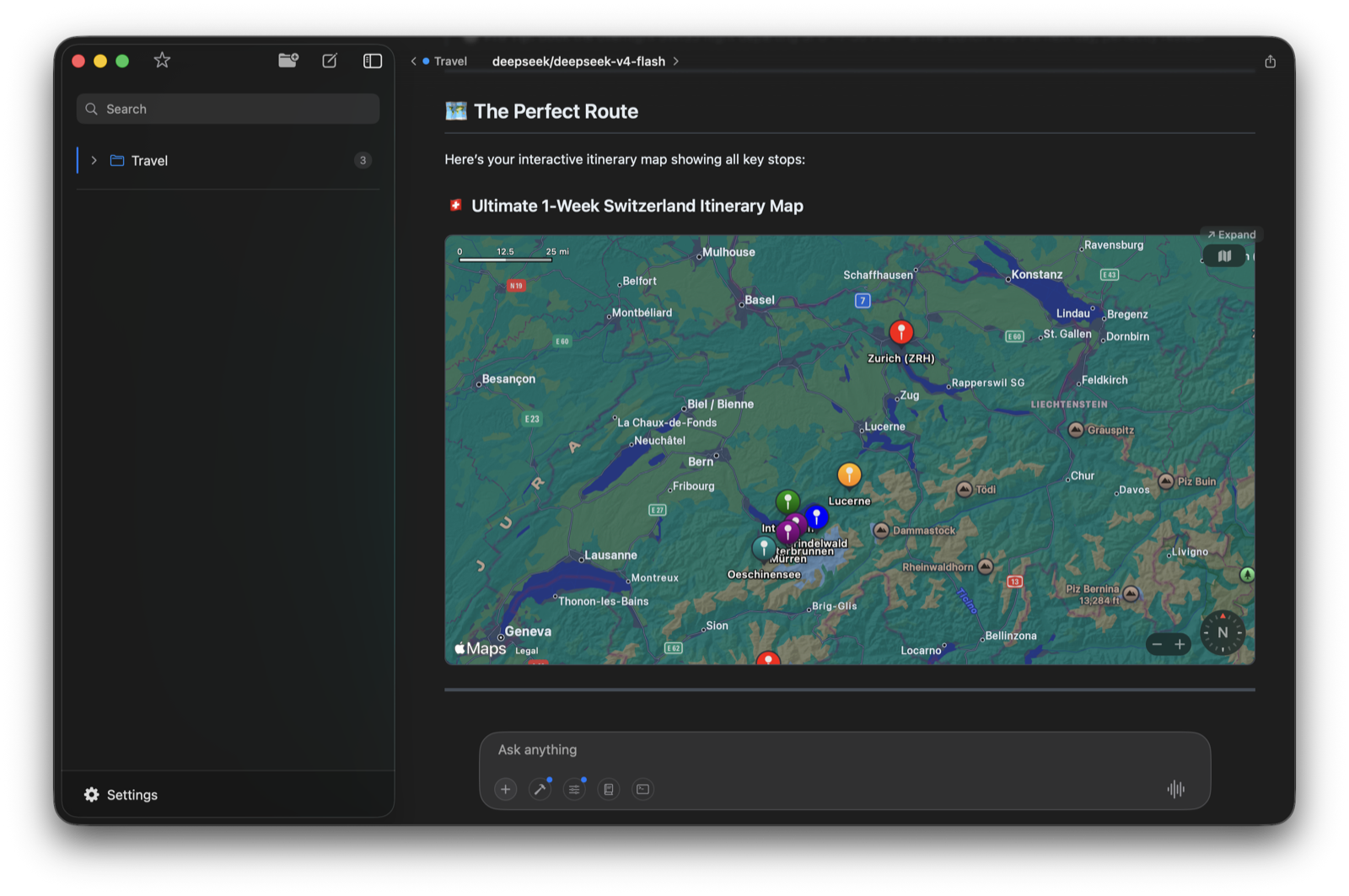
From there the AI works the problem end to end — searching Google Flights for direct SFO routes, pulling Airbnb options with booking links, mapping out the week, and surfacing photos of the stops and trails. It plotted the whole route on an interactive map:
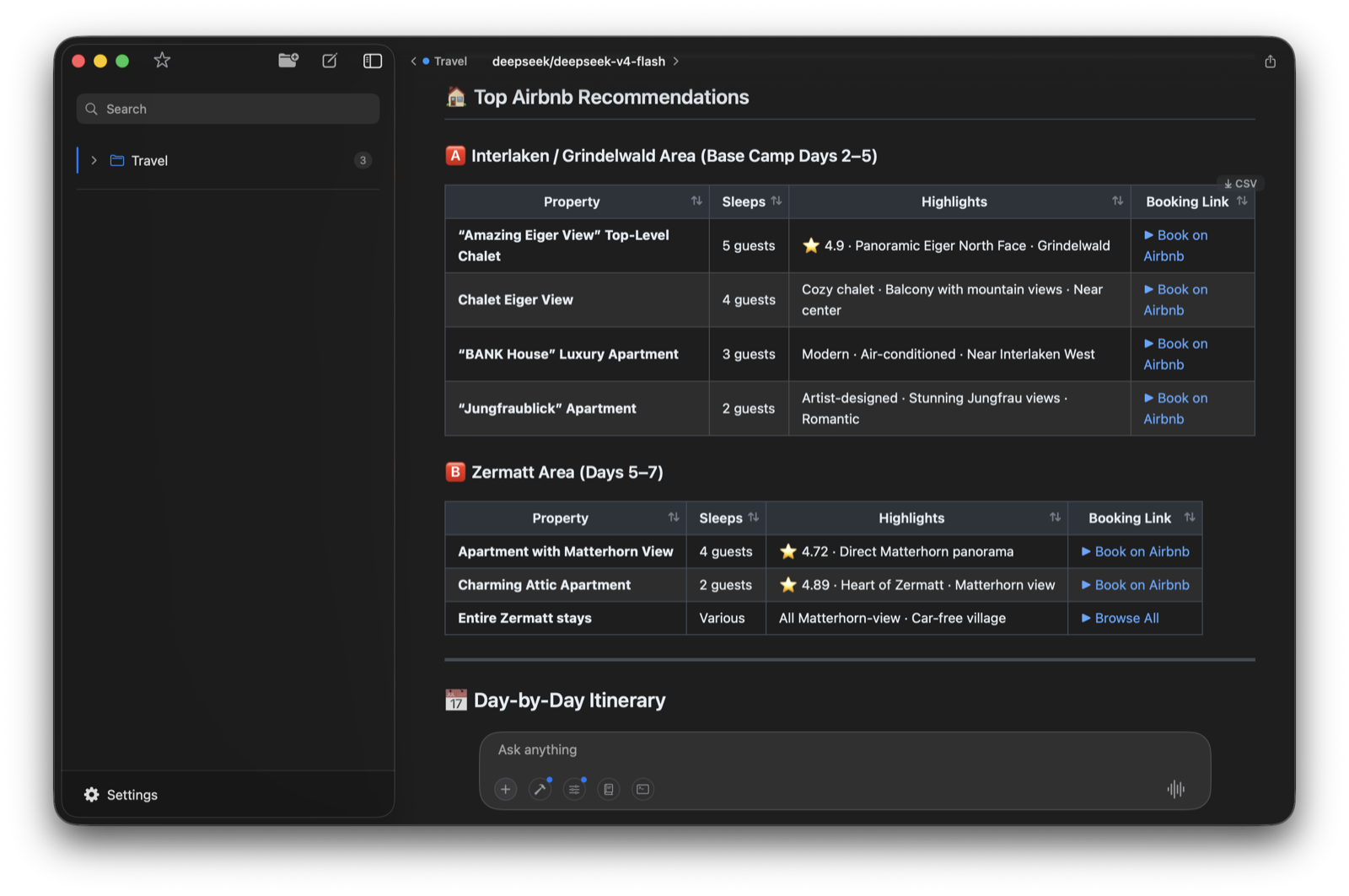
For lodging, it pulled Airbnb options for each base — how many it sleeps, the highlights, and a direct booking link — in a sortable table:
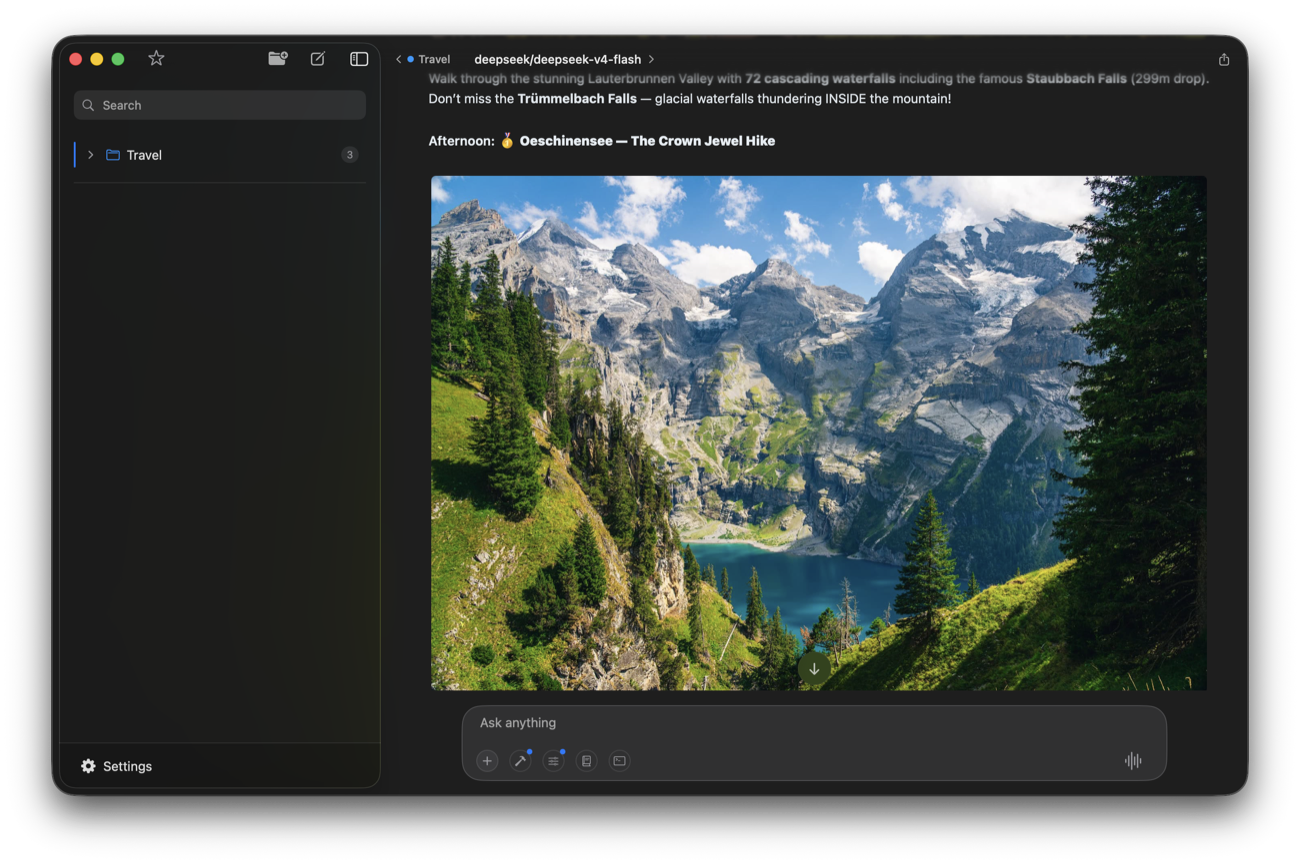
It also gathered photos of the key destinations and the best hikes, so you can actually see where you’re headed — like the Lauterbrunnen valley of waterfalls and the Oeschinensee hike:

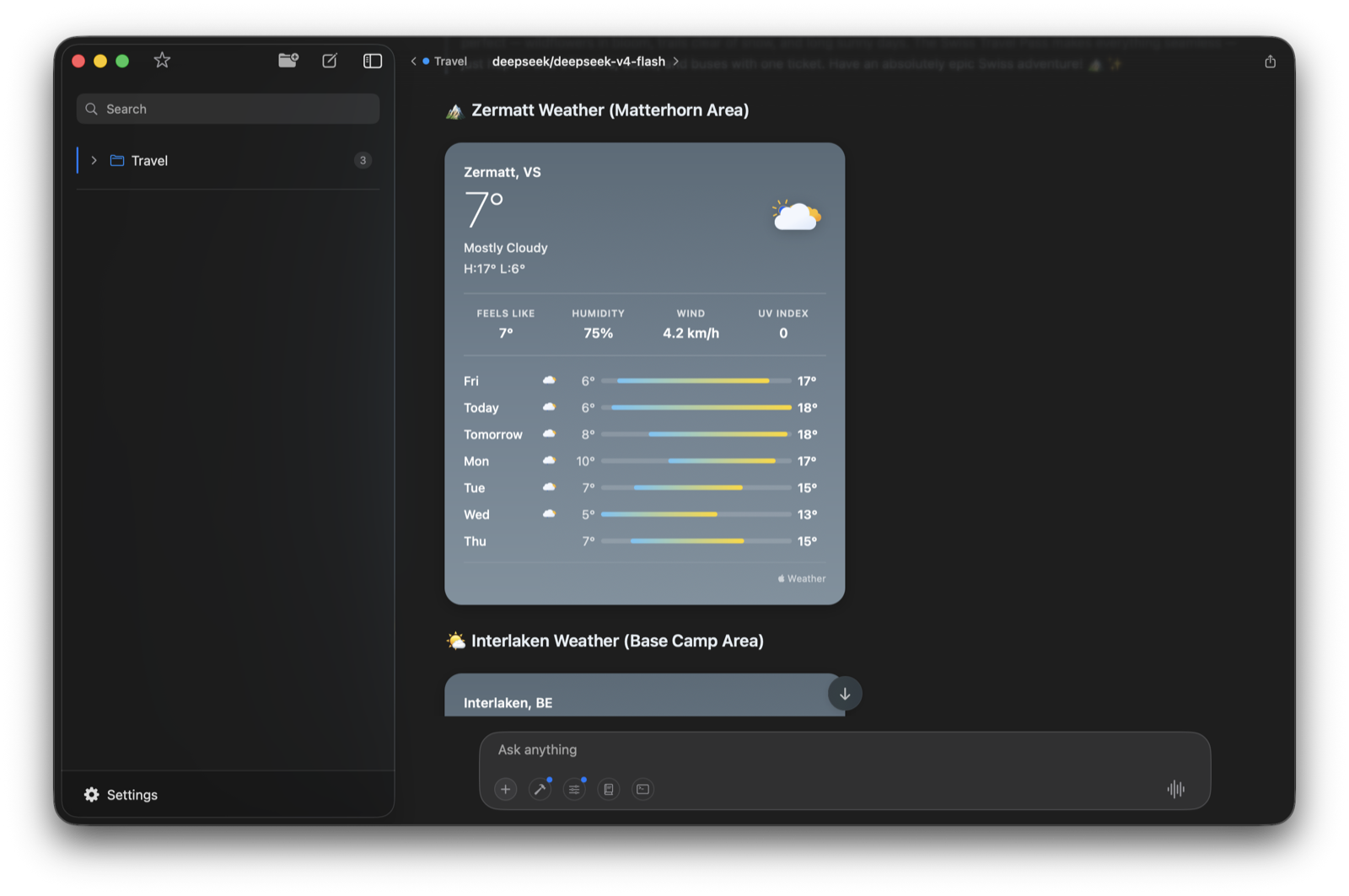
It helps that Elvean comes with Apple Maps, WeatherKit, and Calendar integrations out of the box. That adds whole dimensions to the planning: the itinerary renders on a real interactive map, you can pull the forecast for your exact dates, and you can drop the plan straight onto your calendar.
You can see the whole thing come together in this walkthrough, where I plan our actual Switzerland trip for this summer:
Plan your next trip with AI on your Mac
The point isn’t that AI writes a pretty itinerary — chatbots already do that. It’s that a native Mac app with real tools can search live flight prices, compare Airbnb listings, map your route, check the weather, and hand you booking links, all in one conversation. No twelve browser tabs, no copy-paste.
Download Elvean and try it on your next trip. Happy planning.
Try this workflow yourself — download Elvean for Mac.