AI-powered equity research on Mac
Why I built this
I started Elvean because equity research felt broken. Every session meant the same routine: TradingView in one tab, EDGAR in another, Seeking Alpha, Yahoo Finance, Google — jumping between them, copying bits into a single document. Tedious and slow.
Around summer 2025, AI tools like Claude and Grok started adding web search. That helped — I could get a single consolidated answer from multiple sources. But there were no charts, no access to specific financial data, and no way to build on previous work.
Then MCPs arrived. People started wrapping every API into a server and connecting it to Claude Desktop. I saw a Reddit post where someone described a custom equity research setup: GeminiCLI + Alibaba AntV Chart MCP + Yahoo Finance MCP. It worked, but the experience was rough — multiple terminal windows, no unified UI, no persistence beyond saving markdown files to disk, no way to reuse context across sessions.
I replicated that setup immediately, swapping GeminiCLI for Claude Desktop and connecting the Chart and Yahoo Finance MCPs. Clunky, but impressive — pulling data directly from Yahoo Finance, rendering charts, searching for facts online, all in one conversation.
But Claude Desktop had its own limitations — no inline charts, no persistent context across sessions, no way to organize research by company or sector. So I decided to build it properly. The goal: combine financial research tools into a polished native Mac app where everything works together.
What it took
Making one-shot queries to an LLM wasn’t going to cut it. I needed the model to pull data from multiple sources, call MCP tools, search the web, and render charts — all in a single flow. That meant building an agentic loop: a while loop where you keep sending prompts, history, and tool results until the model decides it has enough to give you a final answer.
The technical challenges stacked up:
- Markdown rendering that supports interactive elements — sortable tables, charts, maps
- Multiple LLM providers — started with Ollama and OpenAI, expanded to all major ones
- MCP connectors with both OAuth and local server support
- Projects with shared system prompts, LLM settings, and a persistent knowledge base
- Exporting results as PDF, Markdown, or HTML
That took 3–4 months of weekends and late evenings. The latest version is very close to what I envisioned six months ago.
Getting started
The best part: you don’t need expensive subscriptions to ChatGPT, Claude, or any financial data provider charging hundreds per month. Here’s a basic setup for financial research.
Full transparency — you’ll need an Elvean Pro subscription ($4.99/month) to use some of these features.
1. Connect an LLM
Enter an API key from your preferred provider. I use OpenRouter — it gives access to 300+ models with pay-as-you-go pricing. Capable models like GLM 5.1 or DeepSeek v4 cost a few dollars per month at my usage level. You can also run local models like Gemma 4 or Qwen if your hardware supports it.
2. Set up Yahoo Finance MCP
The simplest way to get company earnings, financials, and historical stock prices. Grab the yahoo-finance-mcp server and run it locally:
git clone https://github.com/Alex2Yang97/yahoo-finance-mcp.git
cd yahoo-finance-mcp
npx -y mcp-proxy --port 8083 -- uv run server.py
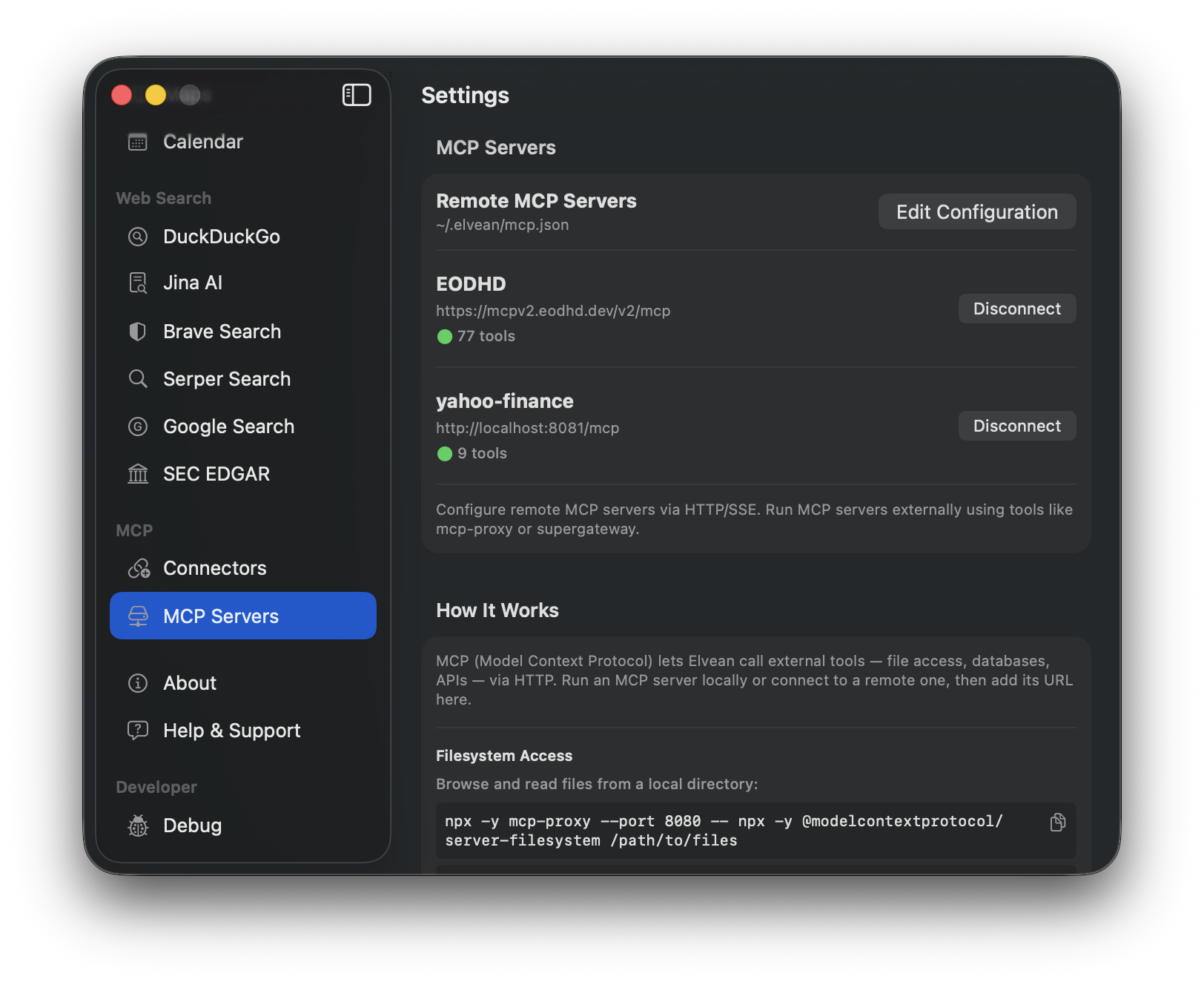
Make sure you have Node.js and npm installed. Then in Elvean, go to Settings → MCP Servers → Edit Configuration and add:
{
  "mcpServers": {
    "yahoo-finance": { "url": "http://localhost:8083/mcp" }
  }
}
If everything is connected, Yahoo Finance will appear in the MCP servers list with a green dot.
3. Financial data connectors
On top of Yahoo Finance, Elvean ships with built-in connectors for financial data:
- SEC EDGAR — query company filings (10-K, 10-Q, 8-K), insider trades, and institutional holdings directly from the SEC. No API key needed — EDGAR data is public domain. Built on our open-source Swift EDGAR client you can use in your own projects.
- EODHD (77 tools) — real-time and historical market data, fundamentals, ETF holdings, and more. Connects via remote MCP with OAuth — one click to authorize, no API key to manage.
- Financial Datasets — income statements, balance sheets, cash flow statements, and historical price data. Also connects via remote MCP with OAuth.
Plus the basics that come with every Elvean install:
- Web search — DuckDuckGo search to augment research with online sources
- File & URL attachments — attach earnings PDFs, analyst reports, or paste article URLs directly into your prompt
That’s already enough for most retail investors and individual traders. No terminal windows, no API key juggling.
4. Set up a project
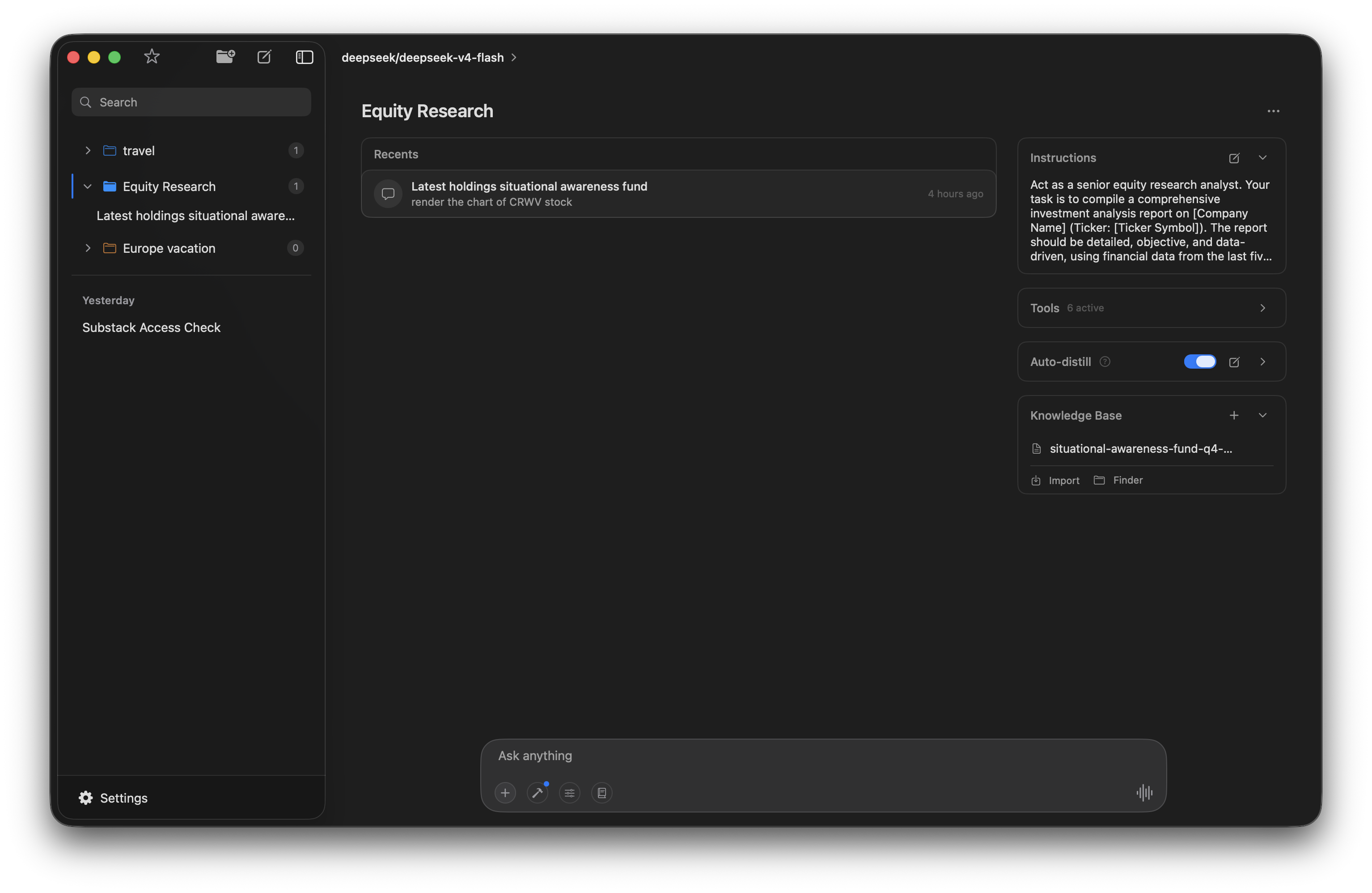
This is where it gets interesting. Create a project — I called mine “Equity Research” — and give it a system prompt that defines how the model should work. Mine looks something like:
Act as a senior equity research analyst. Compile detailed, objective, data-driven investment analysis. Use financial data from the last five years. Present data in charts and tables when possible. Always cite sources.
Every conversation in the project inherits these instructions. You don’t re-type your research style every time.
5. Research in action
With the project set up, you can start asking questions and the model will pull data from multiple sources, render charts, and build structured analysis — all in one conversation.
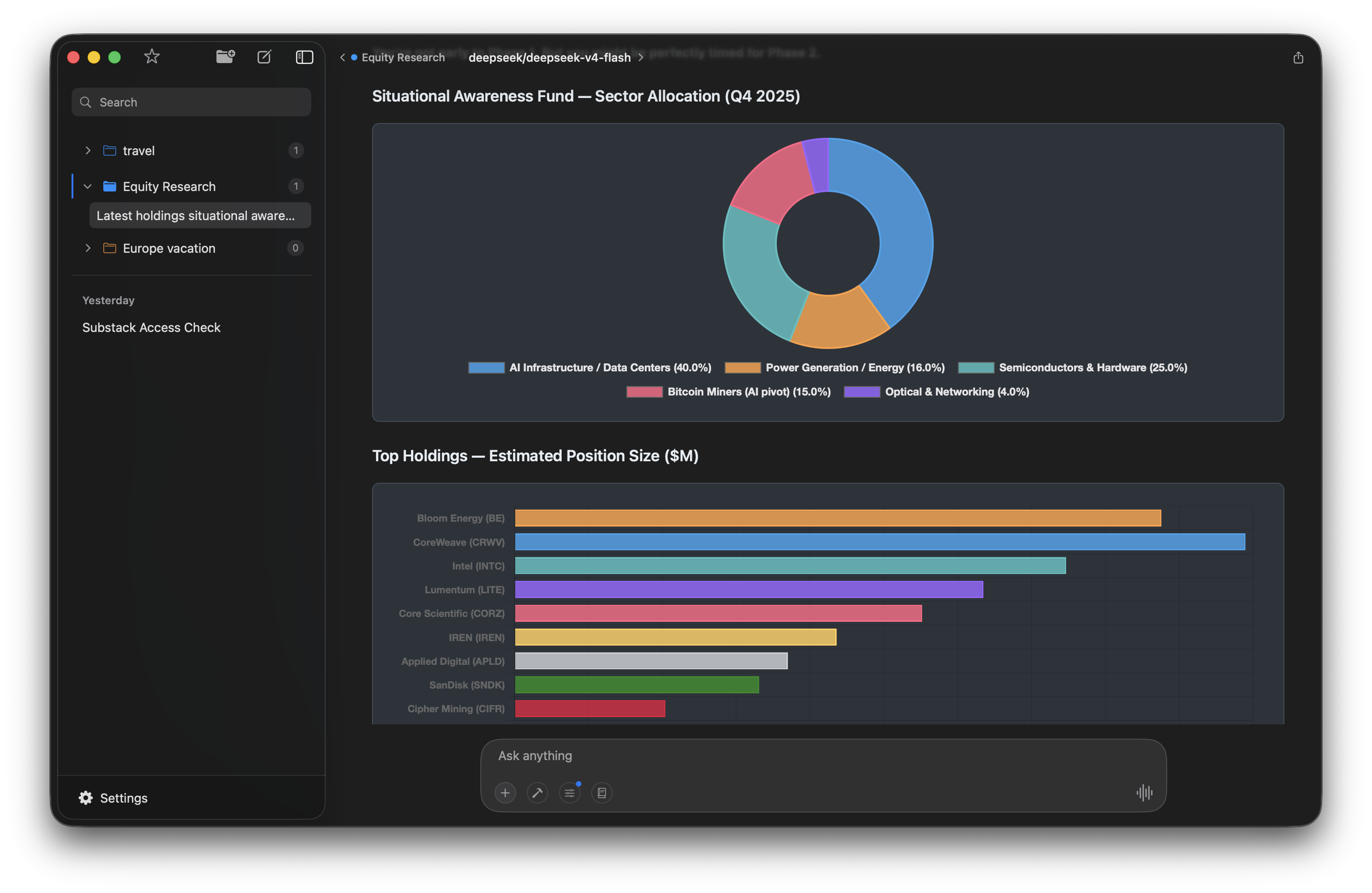
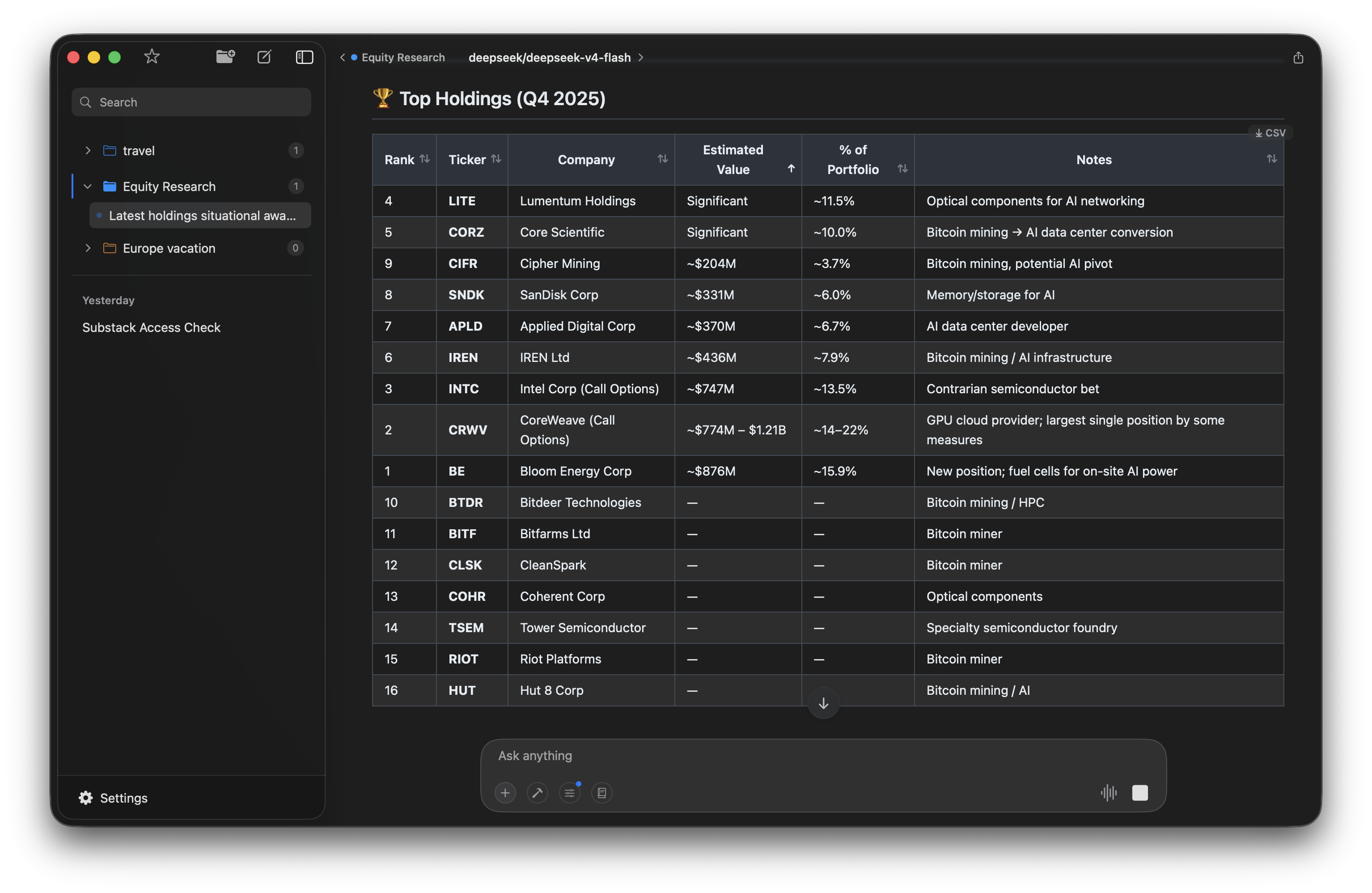
Here’s a real example: I asked it to analyze the holdings of Leopold Aschenbrenner’s Situational Awareness Fund. It pulled the data from EDGAR, broke down sector allocation, and rendered interactive charts:
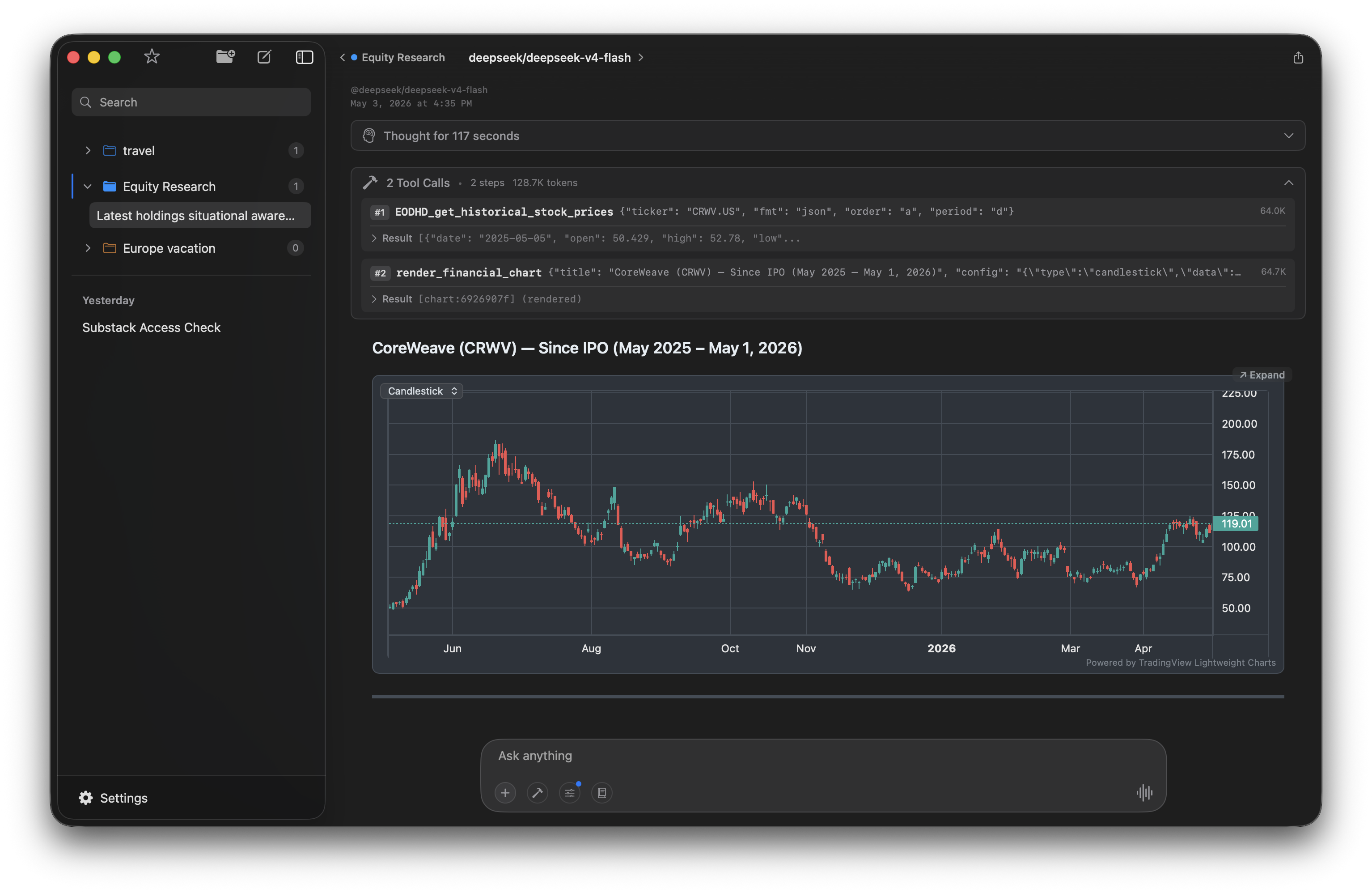
It can also render TradingView-style candlestick charts. I asked for CoreWeave’s price history since IPO and got this — pulled from EODHD, rendered inline:
The holdings data shows up as sortable tables — click any column header to re-sort:
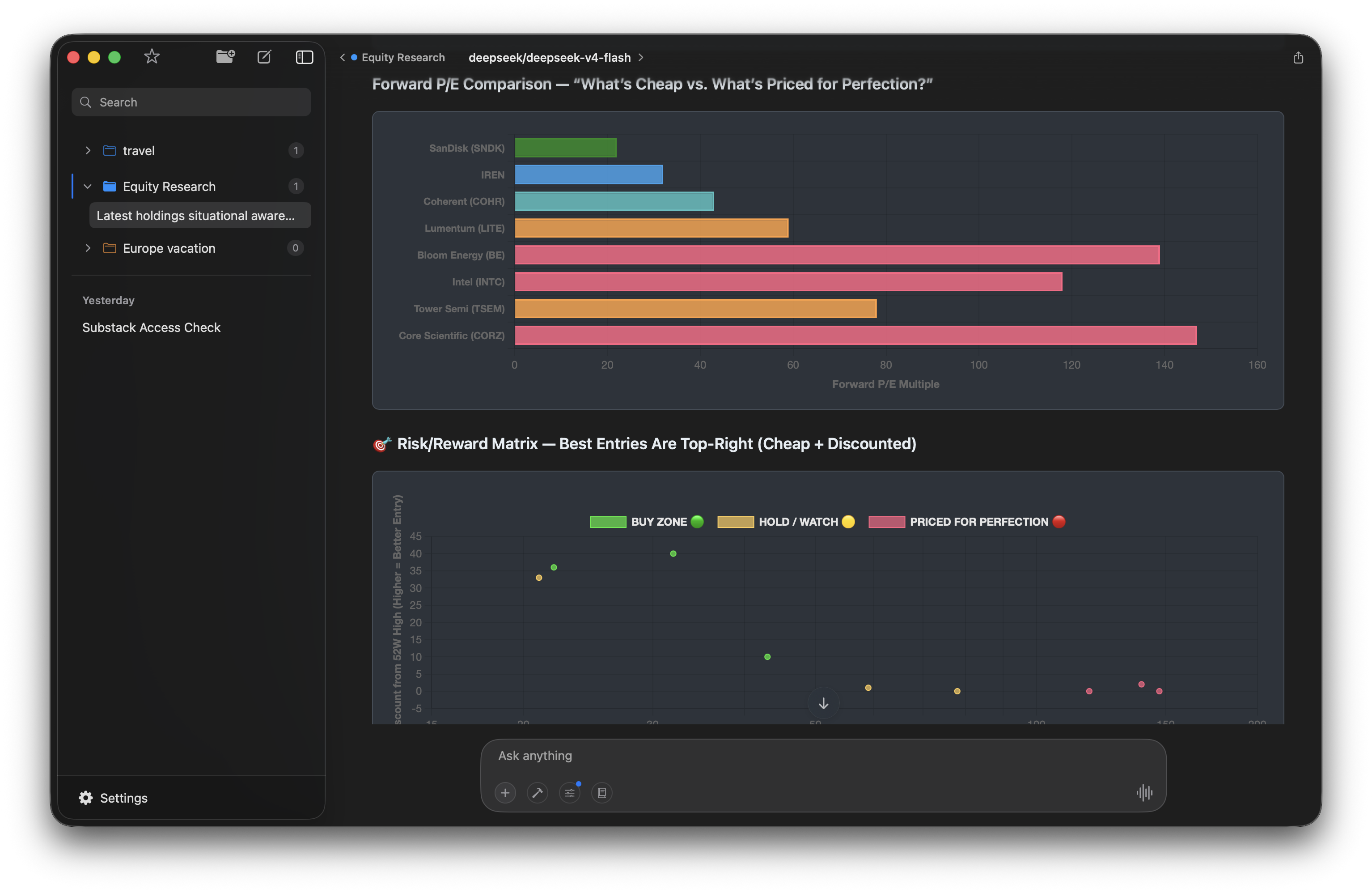
And for comparative analysis — forward P/E ratios across holdings with a buy/hold/watch risk matrix:
6. Knowledge Base and auto-distill
Here’s the part that makes this more than a one-off research session. Turn on auto-distill in your project settings, and after each conversation the model extracts key facts and saves them as Knowledge Base pages.
After analyzing the Situational Awareness Fund, my KB automatically captured: top holdings with estimated values, sector allocation breakdown, individual stock metrics (forward P/E, distance from 52-week range, moving average positions), and the model’s buy/hold/watch verdicts.
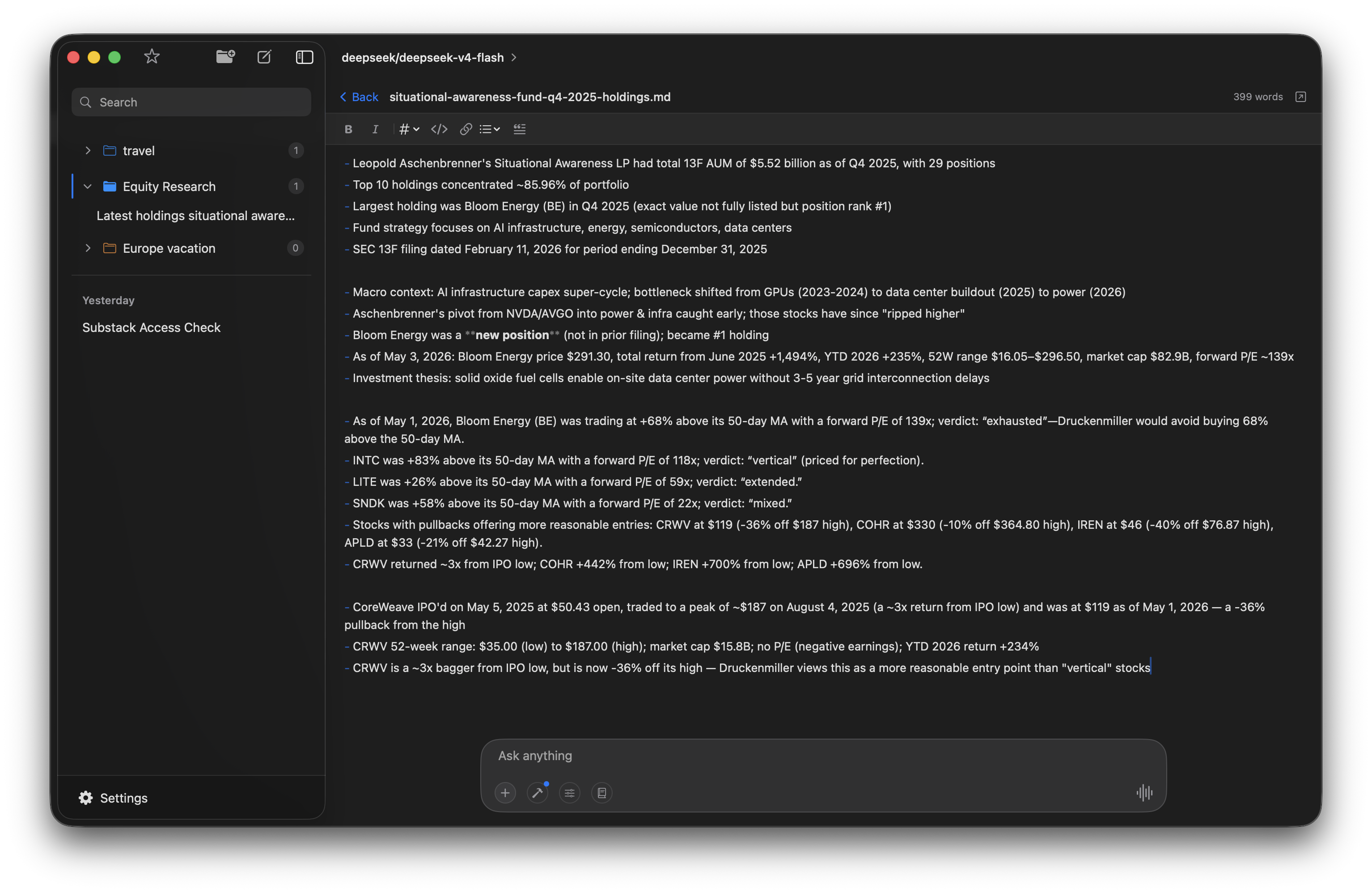
Next time I open a conversation in this project — whether it’s a week later or a month later — the model already knows what I’ve researched. I can ask “has anything changed with the fund’s top holdings?” and it has the baseline to compare against. No re-prompting, no digging through old conversations.
The KB is just markdown files on your Mac. You can edit them, add your own notes, or import external documents. The model can search, read, and write KB pages during any conversation in the project.
What this costs
Let’s add it up:
- Elvean Pro: $4.99/month
- LLM usage: $2–5/month on OpenRouter (depends on model and usage)
- EODHD: free tier available, or bring your own API key
- Yahoo Finance MCP: free
- EDGAR: free (public domain)
Under $10/month for a setup that would have required a Bloomberg terminal or multiple expensive subscriptions a few years ago. Obviously it’s not Bloomberg — but for individual investors and analysts who want to research companies without spending hundreds per month, it gets the job done.
Try this workflow yourself — download Elvean for Mac.